
Homebase: Scheduling & Payroll
Homebase Team ManagementBusiness
4.77.60K Reviews
- Version
- 5.27
- Installs
- 1.00M
- Age Rating
- Everyone
Screenshots
Our Review of Homebase: Scheduling & Payroll
 Analysis by Appyee
Managing shifts, time records, and pay can turn into a pile of separate chores surprisingly quickly. I see the appeal of Homebase: Scheduling & Payroll in its attempt to bring those day-to-day jobs together for small businesses. It is a free business app from Homebase Team Management, with a 4.2 average from around 24,000 ratings and more than a million installs. I’d consider it most useful when a team’s working hours change often and the owner wants a clearer routine than scattered messages and spreadsheets can provide.
Where setup and first use can snag
The first hurdle is less about mastering a complicated system and more about agreeing on how the team will use it. Before relying on the schedule, make sure employees know where to check their shifts and what to do when a shift changes. A tool can make an update visible, but it cannot ensure everyone has read it or understood who is covering the shift. I’d treat the app as the shared place to check the plan, then establish a simple habit of checking it before each workday.
Time tracking also works best when expectations are clear. Decide when people should record a start, finish, or break, and explain how they should flag a missed or incorrect entry. That small conversation can prevent a manager from trying to reconstruct the day from memory when payroll is due. If you are moving from paper records, keep the old process available briefly while the team learns the new routine; switching everything at once can make early mistakes harder to spot.
Checks that make the schedule more useful
I’d begin by entering a typical week rather than trying to plan a complicated month straight away. Check each shift against the real opening hours and the coverage you need, then ask one employee to review the schedule from their own phone. This catches practical snags—such as a shift being assigned to the wrong person or a change not being noticed—before the schedule becomes the source of truth for the whole team.
For a café, shop, or other business with changing coverage, a useful habit is to make schedule edits as soon as they are agreed, rather than leaving them in a text thread until later. That reduces the chance that the manager and employee are looking at different versions. Still, I wouldn’t assume a notification alone settles a shift swap. Make sure both people know the change is final, and check the schedule again when the arrangement affects opening or closing coverage.
The Ultimate Time Management Tool
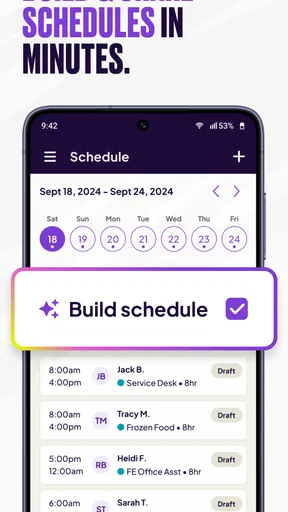
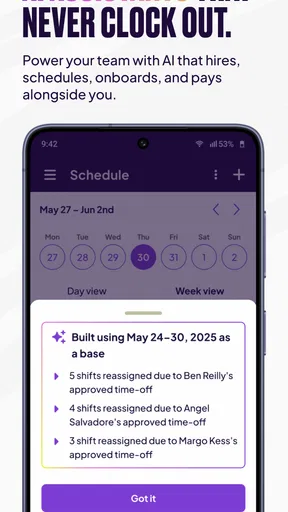
Let’s dive into what makes Homebase: Scheduling & Payroll a standout choice. First off, the scheduling feature is a lifesaver. With just a few taps, you can create, edit, and manage employee schedules. The user interface is super intuitive, so you don’t need a degree in tech to figure it out. You get this neat calendar view that makes it easy to see who’s working when, and you can even drag and drop shifts. How cool is that?
Plus, it sends automatic reminders to your employees about their shifts. No more "I forgot my shift" texts at odd hours. It’s like having a personal assistant who never misses a beat. And for those last-minute changes? No worries! You can adjust schedules on the fly and notify your team immediately.
Payroll Made Easy
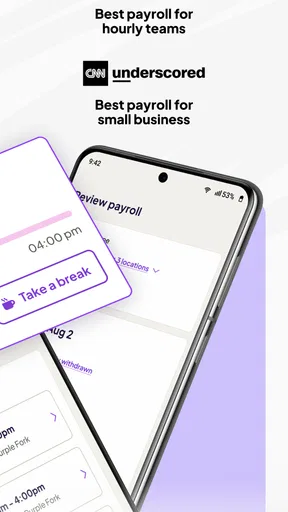
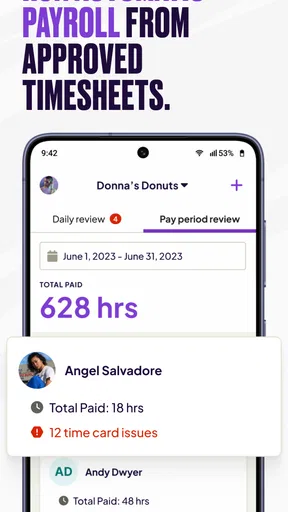
Now, let’s talk about payroll, because if you’re like me, it’s probably your least favorite part of running a business. But with Homebase, it’s a breeze. The app automatically calculates total hours worked, overtime, and even takes into account any breaks. It’s all done for you, and you can export everything directly to your payroll provider. Trust me, it’s like magic.
And the best part? You can manage everything from your smartphone. Whether you’re sipping coffee at your favorite café or catching up on emails at home, you can handle payroll with just a few swipes. It’s flexibility at its finest.
Additional Perks
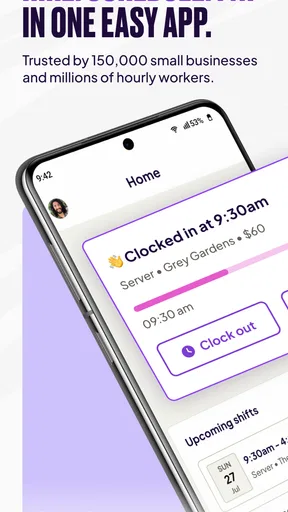
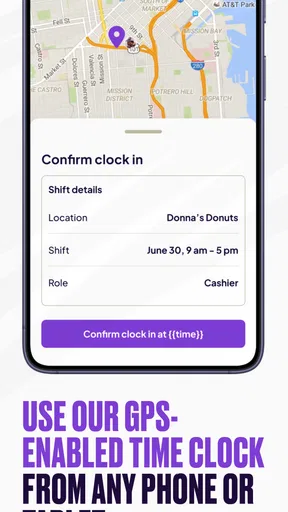
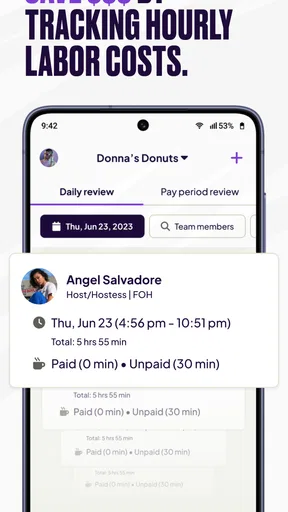
What else does this app bring to the table? Well, there’s a nifty time clock feature that lets employees clock in and out directly from their phones. No more clunky punch cards or manual time sheets. It’s efficient and hassle-free.
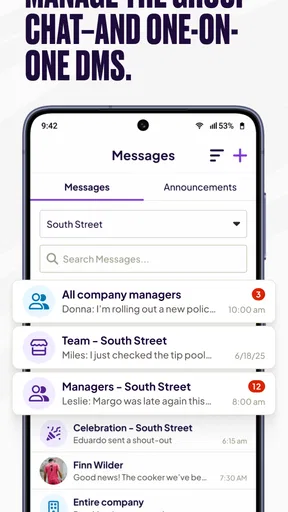
The app also offers team communication tools, allowing you to send messages and updates to your staff. It’s perfect for sharing important announcements or simply checking in. And if you’re worried about security, Homebase has you covered with top-notch data protection measures.
Recovering when records or plans go wrong
Even with a tidy workflow, people forget to clock in, record a break incorrectly, or notice a schedule change late. My practical advice is to deal with those exceptions while they are still fresh. Ask the employee to explain what happened, compare that account with the shift plan, and correct the record before treating it as ready for payroll. A time total is only as dependable as the underlying entries, so a quick review is more useful than assuming automation has resolved every discrepancy.
For a late schedule change, I’d use a clear sequence: make the edit, notify the affected person, and confirm directly if the change is important to opening, closing, or adequate coverage. For a missed time entry, record the correction through the available process and keep a note of why it changed. That gives a manager a more defensible trail than silently adjusting a number at the end of the week. The app can organize the work, but the manager still needs to make judgment calls.
When the app may not be the problem
If a worker cannot see a schedule or a manager cannot reconcile hours, it is tempting to blame the app immediately. I’d first check the basics: is everyone using the intended account, are they looking at the right week, and has the latest change actually been saved? Then check whether the issue affects one person or the whole team. A problem limited to a single device may call for reopening the app or checking the connection, while a misunderstanding about which shift is current is more likely a communication issue.
It also helps to separate a calculation question from a policy question. The app can total recorded hours, but a business still has to decide how it handles approvals, corrections, and unusual shifts. If the team has complex pay rules or needs a specialist payroll process, confirm that the workflow fits before making it the sole record. Homebase is most convincing as a practical coordination tool for straightforward small-team routines, not as a replacement for every employer decision.
Payroll Made Easy
Now, let’s talk about payroll, because if you’re like me, it’s probably your least favorite part of running a business. But with Homebase, it’s a breeze. The app automatically calculates total hours worked, overtime, and even takes into account any breaks. It’s all done for you, and you can export everything directly to your payroll provider. Trust me, it’s like magic.
And the best part? You can manage everything from your smartphone. Whether you’re sipping coffee at your favorite café or catching up on emails at home, you can handle payroll with just a few swipes. It’s flexibility at its finest.
Additional Perks
What else does this app bring to the table? Well, there’s a nifty time clock feature that lets employees clock in and out directly from their phones. No more clunky punch cards or manual time sheets. It’s efficient and hassle-free.
The app also offers team communication tools, allowing you to send messages and updates to your staff. It’s perfect for sharing important announcements or simply checking in. And if you’re worried about security, Homebase has you covered with top-notch data protection measures.
A realistic shift-to-payroll routine
Picture a small shop manager opening on Monday and finding that one employee has called out. The manager adjusts coverage, updates the schedule, and tells the replacement what changed. During the week, staff record their time, while the manager checks exceptions instead of waiting until payday to discover a missing entry. Before sending hours to the payroll provider, the manager reviews unusual totals and confirms corrections with the people involved. This is where combining scheduling and time records can save effort: the schedule provides context for checking the hours, rather than forcing the manager to reconcile several disconnected documents.
That workflow is not entirely hands-off. The manager still has to decide whether coverage is adequate, whether a recorded time entry makes sense, and whether an exception needs follow-up. I’d use the app to make those decisions easier to organize, not to make them automatically. One useful trade-off is to keep messages focused: use team communication for operational updates, but put the actual shift change in the schedule as well. That helps avoid a situation where a message says one thing and the calendar still shows another.
Who benefits, and who may prefer another approach
I think Homebase suits owners and managers of small teams whose schedules need regular edits and whose payroll preparation depends on hours worked. It is especially appealing if the current routine involves a calendar, separate time sheets, and repeated reminders to staff. Employees can check their shifts and record time on a phone, while a manager can handle schedule adjustments without being tied to a desk. The developer’s focus on team management is reflected in that practical, shift-centered use.
It may be a poor fit for a solo business with no employees, a team that rarely changes its hours, or a company already satisfied with its scheduling and payroll systems. In those cases, the extra process of moving everyone to another app may outweigh the convenience. A paper rota or shared calendar can remain simpler for a very small, stable group; a dedicated payroll system may be preferable when payroll is the main need or the rules are unusually complex. Homebase’s value is strongest when scheduling and time records are connected in the same routine.
It is free to start, but the app also includes in-app purchases priced from about $30 to $650 per item, so I would check what a business actually needs before committing to a paid option. The age rating is Everyone, and version 4.90 requires iOS 12 or later. Those details matter when deciding whether a team’s devices can use it and whether the available plan fits the business, rather than assuming every feature or workflow comes at no cost.
Is It Worth It?
So, is Homebase: Scheduling & Payroll worth your time and investment? In my opinion, absolutely. It’s a comprehensive solution that simplifies the otherwise daunting tasks of scheduling and payroll. The app is designed with small businesses in mind, making it accessible and affordable.
If you're tired of juggling spreadsheets and dealing with payroll headaches, give Homebase a try. It’s like having a personal assistant right in your pocket, ready to handle all your scheduling and payroll needs. And who wouldn’t want that?
In a nutshell, Homebase is a game changer for anyone looking to streamline their business operations. So, go ahead and check it out. Your future self will thank you!
How I’d decide before switching
Before inviting a whole team, I’d map one ordinary week: who creates the schedule, who checks it, how changes are confirmed, and who reviews time records before payroll. That simple exercise reveals whether the app addresses a genuine bottleneck or merely relocates it. If managers can agree on those responsibilities and employees are comfortable checking a phone for shift information, the move is easier to justify. If people rely on a different established process or rarely need schedule changes, there may be little to gain.
I’d also test an awkward but common case early, such as a missed clock-in or a late shift swap, rather than only entering a clean schedule. That shows whether the team understands how corrections are handled and where a manager needs to step in. The best result is not a promise of zero mistakes; it is a more visible process for catching them before they affect pay or leave someone unsure about a shift.
Final take on the day-to-day experience
For me, Homebase’s strongest case is the link between planning shifts and keeping track of the hours that follow. It can replace some of the back-and-forth that makes a small operation feel harder to coordinate than it should. Its limits are just as practical: a manager must verify important changes, check time records, and make sure the team follows a shared routine. If that sounds manageable, it is a useful option to explore; if you need only one narrow tool or have complex payroll demands, a more specialized setup may serve you better.
Privacy and Permissions
See what permissions an app requests and how it handles your data.
- Identity
- find accounts on the device
- Calendar
- read calendar events plus confidential information, add or modify calendar events and send email to guests without owners' knowledge
- Contacts
- find accounts on the device, read your contacts
- Location
- approximate location (network-based), precise location (GPS and network-based)
- Phone
- directly call phone numbers
- Photos/Media/Files
- read the contents of your USB storage, modify or delete the contents of your USB storage
- Storage
- read the contents of your USB storage, modify or delete the contents of your USB storage
- Camera
- take pictures and videos
- Microphone
- record audio
- Wi-Fi connection information
- view Wi-Fi connections
- Other
- view network connections, change network connectivity, full network access, run at startup, control vibration, prevent device from sleeping, read Google service configuration
Verdict
Strengths of Homebase: Scheduling & Payroll
- Intuitive scheduling interface.
- Seamless payroll integration.
- Real-time team communication.
- Customizable reports available.
- Free version with essential features.
Limitations of Homebase: Scheduling & Payroll
- Limited offline functionality.
- Occasional syncing issues.
- Advanced features are paid.
- User interface can be cluttered.
- Mobile app lacks some web features.
Similar Picks in This Category
View All
LinkedIn: Community & Network
LinkedIn3.8

Zoom Workplace
zoom.com4.1

Microsoft Teams
Microsoft Corporation4.6

Meta Business Suite
Meta Platforms, Inc.4.6

Webex Meetings
Cisco Systems, Inc.4.5

TeamViewer Remote Control
TeamViewer4.4
Frequently Asked Questions
What features does Homebase offer for employee scheduling?
Homebase provides a comprehensive set of tools for employee scheduling, allowing managers to create, edit, and publish schedules with ease. It includes features like shift swapping, availability management, and real-time notifications. Additionally, employees can access their schedules via the app, making it easier to stay informed and make requests.
How does Homebase handle payroll management?
Homebase simplifies payroll by integrating time tracking with payroll services. It automatically calculates hours worked, overtime, and breaks, ensuring accurate payroll processing. Users can export timesheets directly to popular payroll providers, reducing errors and saving time. This feature is essential for businesses looking to streamline their payroll operations.
Is the Homebase app user-friendly for both managers and employees?
Yes, Homebase is designed to be intuitive and user-friendly for both managers and employees. The interface is clean and easy to navigate, with clear instructions and helpful prompts. Employees can easily check schedules, request time off, and communicate with coworkers, while managers can efficiently manage teams and tasks.
Can Homebase integrate with other business software?
Homebase offers integrations with a variety of popular business software tools, including QuickBooks, Square, and Gusto. These integrations make it easier to sync data across platforms, ensuring seamless operations and reducing the need for manual data entry. This feature is particularly useful for businesses already using these services.
What is the cost of using Homebase, and are there any free features?
Homebase offers a free version that includes essential features such as scheduling, time tracking, and team communication. For businesses needing more advanced features, there are paid plans available. These plans provide additional benefits like advanced reporting, payroll integrations, and priority support, catering to different business needs and budgets.
